
Imagine you are building a smart app that acts like a helpful friend. It reads messages, drafts emails, and solves even the most complex problems in seconds.
Now, imagine that same app suddenly starts giving your users incorrect answers or sending broken computer code. For developers, this is nothing short of a nightmare.
This is where TypeSafe AI steps in to help. It acts like a strict traffic guard for artificial intelligence, ensuring that every response adheres to precise safety rules.
Why does modern software need TypeSafe AI?
Building software used to be like assembling LEGO blocks. Each piece had a fixed shape and fit perfectly into its designated spot.
Modern artificial intelligence has changed everything by behaving more like clay. It is incredibly flexible and creative, but it can easily lose its shape.
When an AI model generates unstructured text, your application might crash because it encounters words where it expected numbers.
Using TypeSafe AI bridges the gap between flexible artificial intelligence and rigid software systems. It compels the AI to deliver data in a clean, expected format every time.
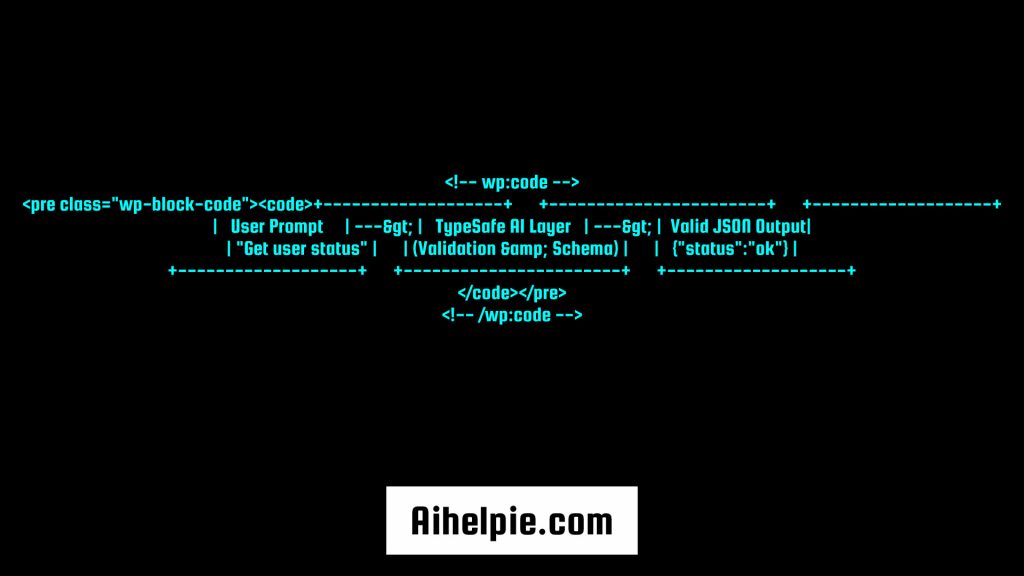
+-------------------+      +-----------------------+      +-------------------+
|   User Prompt     | ---> |   TypeSafe AI Layer   | ---> |  Valid JSON Output|
| "Get user status" |      | (Validation & Schema) |      |   {"status":"ok"} |
+-------------------+      +-----------------------+      +-------------------+
What Does TypeSafe AI Actually Mean?
To understand this concept, think about filling out an online form.
If a website asks for your age, you type a number like 15 or 25. If you type the word “apple” instead, the form stops you and shows an error.
In computer programming, a “type” tells the computer what kind of data it is handling, such as a number, a piece of text, or a true/false value.
- Type Safety: A rule system that guarantees data always matches its expected category.
- Unstructured Output: Free-form text generated by standard chat models.
- Structured Output: Neat data formatted specifically for apps to read without errors.
When you use typesafe AI, you define a schema, which is simply a list of rules for your data. The AI is then required to deliver answers that fit those exact rules.
A Simple Analogy: The Coffee Machine Rule
Think of a standard AI model like a friendly barista at a cafe. You ask for a coffee, and they might hand you a paper cup, a ceramic mug, or even a glass jar.
The drink tastes great, but the container changes every time you order. If your car cup holder only fits paper cups, you have a big problem.
A typesafe AI setup works like a coffee machine designed for that exact cup holder. No matter what drink you select, it always dispenses into the exact cup size your car expects.
Your app never has to guess what kind of container it will get. It receives predictable results that work every single time.
Key Benefits of Using TypeSafe AI in Your Projects
Switching to a structured data approach for smart applications offers huge advantages for creators and users alike.
1. Fewer App Crashes
When software receives unexpected input, it often freezes or crashes completely. Enforcing data rules prevents bad inputs from reaching your core systems.
2. Safer User Experiences
It keeps AI models from outputting random, off-topic, or harmful text. Your application stays predictable, reliable, and completely advertiser-safe.
3. Faster Development
Developers spend less time writing custom code to clean up messily formatted text. They can focus on building great features instead.
4. Reliable Database Saving
Database systems require clean data entries. Standardized outputs make it easy to save AI responses directly into storage without manual cleanup.
How TypeSafe AI Works Behind the Scenes
You might wonder how a loose language model learns to follow strict rules. It happens through a clever three-step process.
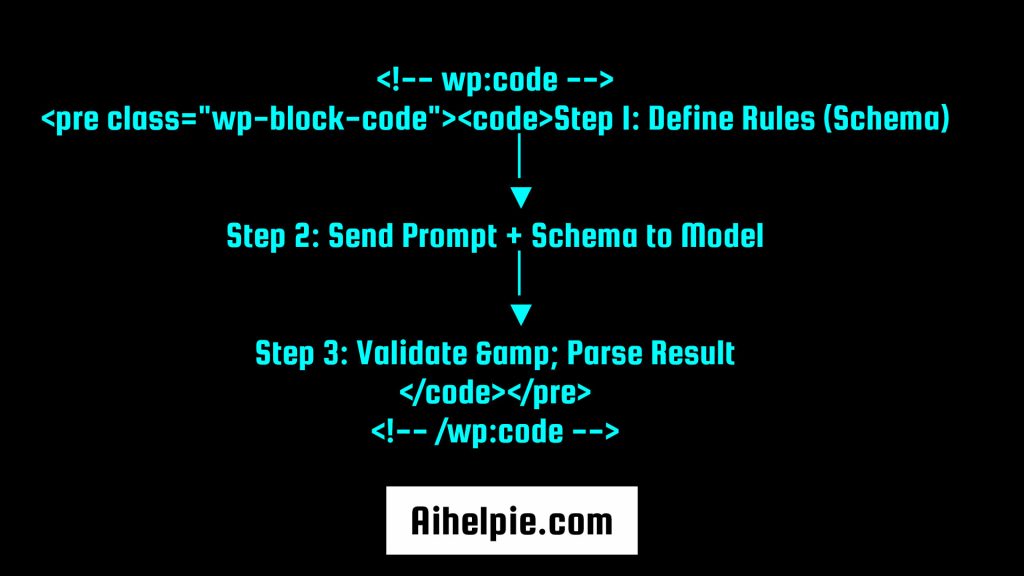
- Define the Schema: You write a simple blueprint using tools like TypeScript, Zod, or Pydantic to state what data you need.
- Constrain the Model: The system sends your request to the AI model along with instructions to limit its output format.
- Validate the Result: Before the answer reaches your application, the system checks every character against your blueprint.
If the response fails the check, the system automatically asks the model to fix its mistake before a human ever sees it.
Popular Tools for Building TypeSafe AI Applications
Developers use several lightweight libraries to bring structure to their smart applications today.
| Tool Name | Primary Language | Best Used For |
| TypeChat | TypeScript | Turning natural language prompts into typed JSON structures. |
| BAML | Multi-Language | Writing custom data extraction prompts with strong type guarantees. |
| Zod | JavaScript / TypeScript | Validating schemas and ensuring data safety at runtime. |
| Instructor | Python | Extracting structured data easily using Pydantic models. |
Real-World Examples of TypeSafe AI in Action
E-Commerce Product Recommendations
An online store uses AI to read customer reviews and tag products automatically. The system forces the model to choose tags only from a preset list, like “durable,” “fast shipping,” or “great value.”
Customer Support Automation
A helpdesk bot reads incoming user messages and extracts three key details: the user’s issue, the priority level, and the order number. Because the output is structured, the ticket routes to the right team instantly.
Smart Form Fillers
Medical clinics use AI to summarize long patient intake notes into specific database fields like age, symptoms, and allergies, ensuring critical info is never placed in the wrong box.
Tips to Start Implementing TypeSafe AI Today
If you are a builder looking to make your smart projects more reliable, keep these handy tips in mind.
- Start with Small Schemas: Keep your data blueprints simple at first. Define only the essential fields you really need.
- Use Clear Field Names: Give your schema properties obvious names like
userAgeorisSubscriberso the AI understands them instantly. - Add Detailed Descriptions: Include short comments in your schema to explain what each field represents.
- Set Up Fallback Responses: Always prepare a default answer in case the model encounters an unexpected network error.
- Test Edge Cases: Test your setup with unusual prompts to make sure your validation layers catch weird outputs.
Frequently Asked Questions
Q. What is typesafe AI in simple terms?
A. It is an approach to building software where artificial intelligence is forced to return data in a strict, pre-defined format, preventing app errors and crashes.
Q.How does typesafe AI improve application security?
A. It acts as a filter that checks every response against strict rules before it reaches your core app, keeping bad or corrupted data out of your database.
Q.Do I need to be an expert programmer to use it?
A. No, modern developer tools make it simple to set up structured rules using basic coding knowledge in popular languages like Python or JavaScript.
Conclusion
Building smart tools should make our lives easier, not harder. Unstructured responses can cause headaches, but adopting typesafe AI gives you complete control over your application’s data flow.
By combining the creative power of artificial intelligence with the reliability of strict data rules, you can create smooth, crash-free applications that users love.
Are you ready to make your software smarter and safer? Start adding structured schemas to your next project today and experience hassle-free building!